Showing posts with label Problem and Solution. Show all posts

Monday, January 30, 2017

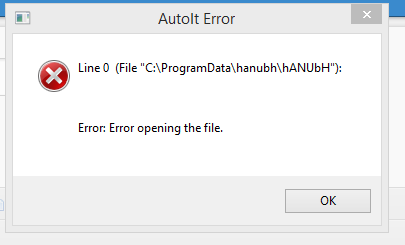
How to fix autoit error windows 7?


HI Viewers,

Greetings my blog. Here I will discuss about autoit error windows 7 . Here is the steps ..

Step 1.
press windows logo + R

Step 2.
type regedit and hit ok or enter.

Step 3.
user account control click yes.

Step 4.
press ctrl+shift+esc.

Step 5.
find process tab named autoid3.exe click end process. and autoit3wrapper.exe click end process.

Step 6.
In the registry editor dialogue box go to HKEY_CURRENT_USER/Software/Microsoft/Windows/Run . You will find the affected file called autoit or googleupdate.ink these must be delete.

Step 7.
In the registry editor dialogue box go to HKEY_LOCAL_MACHINE/Software/Microsoft/Windows/Run . You will find the affected file called autoit or googleupdate.ink these must be delete.

Step 8.
Go to c: drive. You will find google and skype folder. Delete these files. If not found then find organize tab then folder and search options. then view tab select show hidden files and untick hide protected operating system files. Now you will find these google and skype folder , now delete these folder.

Step 9.
Restart the pc. and enjoy..

Thanks for wathing..


Friday, January 27, 2017

How to fix logon process initialization has failed on windows 7?

Hi all,

Today I am going to solving the problem which is logon process initialization has failed. Here is the solutions step by step.

Step 1.

insert the booting disk.

step 2.

press any key when the screen shows press any key to boot from cd or dvd.


Step 3.

press enter to windows setup.

Image result for windows 7 setup or recovery


Step 4.
click next.


Step 5.
click repair computer
Image result for repair your computer


Step 6.
click windows 7 and click next
Image result for system recovery options

Step 7.
click system restore.
Image result for system restore


Step 8.
click next
Image result for system restore


Step 9.
Click scan for affected program


Image result for system restore

Step 10.
Chose which program is affected then next


Image result for system restore affect programs

Step 11.
Click finish

Final step.
Restart the pc.
Thanks for waiting..